88jl App — Keep It in Your Pocket, Play Slots & Card Games Anytime
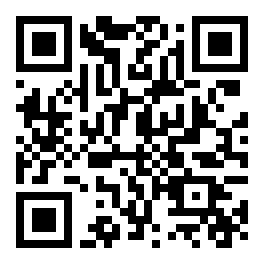
Install the APK directly on your Android phone, just 58 MB. Deposit in minutes via bKash, Nagad or Rocket and enjoy 4,600+ games right on your mobile.
File safe · Android 7.0+ · Free download · Version 3.9.2

App — File Info & Download
There's no separate APK for iOS — open the site in Safari and add a shortcut to your home screen. It works just like the App.
-
Open 88jl.im in Safari This feature doesn't work in other browsers
-
Tap the Share icon at the bottom It sits in the middle at the very bottom of the screen
-
Choose "Add to Home Screen" Scroll the list a little and you'll find it
-
Name it "88jl" → tap "Add" An icon appears on your home screen
-
Tap the icon and log in straight away Next time, open it from here


What you can play in the App
Install the APK on your Android phone — step by step
Follow the steps below on any phone running Android 7.0 or later. The whole process takes 2–3 minutes.
-
1
Allow installs from unknown sources
On your phone go to Settings → Security (or Privacy) → turn on "Unknown Sources" or "Install unknown apps". On Samsung it's under Settings → Biometrics and Security. On Android 8.0+ you grant permission per app — allow Chrome or your file manager.
-
2
Download the APK file
Tap the "Download APK" button on this page. 88jl.apk (58 MB) lands in your Downloads folder. It downloads fine on both WiFi and mobile data. You'll see it in the notification bar when it's done.
-
3
Install from your file manager
Open your phone's file manager → go to the Downloads folder → tap 88jl.apk → press "Install". Installation starts and finishes in 30–60 seconds. If Play Protect shows a warning, tap "Install anyway" — the file is safe.
-
4
Open the app and log in
When installation finishes, the 88jl icon appears on your home screen. Tap it and enter your phone number and password on the login page. New here? Register — an account takes just 5 minutes to create.
-
5
Make your first deposit and play
Open the app and go to the Deposit section. Add a minimum of ৳৪০০ via bKash, Nagad, or Rocket — your balance is usually updated within 1 minute. Then head straight to Slots, Card Games, or Sports — whichever section you prefer.
What you get on the 88jl App — including features not available on the browser
One-tap quick login
No need to search for the link every time. Open the app directly from your home screen icon. Supports password managers and biometric lock.
Push Notifications
Bonus offers, match results, and deposit confirmations will be delivered straight to your phone. You can turn notifications on or off from your settings.
Direct bKash/Nagad payments
Deposit and withdraw right from the app. Average deposit time is 1 minute, withdrawals take around 37 minutes. Minimum deposit is ৳৪০০.
True Live Casino
The app uses background cache to keep streaming smooth. Go to the Casino section and jump straight to your table.
Sports Betting & Live Scores
Place live bets while the match is going on. Score updates and odds changes appear in real time. Cricket, football, T20 — it's all there.
24/7 Live Chat Support
Open the support chat directly inside the app. No need to leave the page. Get help any time, day or night.
App vs Browser: Which one works better for you
You can play 88jl both ways — but the app comes with a few extra advantages that the browser simply doesn't offer.
| Feature | 88jl App (Android) | Mobile Browser |
|---|---|---|
| Opening Speed | Directly from the icon | Have to open browser and type the address |
| Push Notifications | Available | Not available |
| Data Usage | Saves cache, uses less data | Reloads every time |
| Live Casino Streaming | Smooth, less buffering | Depends on your network |
| Installation Required | APK install needed (58 MB) | Nothing to install |
| iOS Support | APK on Android; browser shortcut on iOS | Works directly |
| Best For | Regular players, casino & sports fans | Occasional players |
Verdict: Play regularly on mobile? Download the app. Play occasionally? The browser works just fine.
Download the AppTips for running 88jl on low RAM devices and slow networks
The 88jl app can run on older Android phones or 2G/3G networks. Follow these tips to keep your games running smoothly.
Low RAM phones
Close other apps before you start playing. Clearing background apps frees up memory for 88jl. Slots run well even on phones with 2 GB RAM.
2G / 3G networks
Slots and card games work fine on low data. Live casino requires at least 4G or WiFi. On a slow connection, skip live games and go with slots instead.
Saving data
Turn on "Data Saver" mode inside the app if available. In your phone settings, disable background data for 88jl — this way all data goes directly to the game while you play.
Saving battery
Keep screen brightness around 60%. Power saver mode helps the phone stay cooler. For long sessions, it's better to keep your phone on charge while playing.
Keep storage clear
Keep at least 150 MB free on your phone. A full storage can cause the app to crash. After installing the APK, you can delete the .apk file from your Downloads folder.
Keep the app updated
Older versions tend to have more bugs. Current version is 3.9.2 (updated: 21 November 2026). When a new APK is available, download and install it from this page.
Installation stuck? Problems and fixes
A Installation is blocked — showing "Install blocked" or "Not allowed"
Reason: Unknown Sources option is turned off.
Fix: Go to Settings → Security → turn on "Unknown sources" or "Install unknown apps". On Android 8.0 and above, grant permission to Chrome or your file manager app. Then tap the .apk file again to install.
B "Parse error" or "There is a problem parsing the package"
Cause: The download didn't complete properly or the file is corrupted.
Fix: Delete the old .apk file and download it fresh from this page. This error also happens if your internet drops while downloading.
C "Insufficient storage" — not enough space on your phone
Cause: Your phone has less than 58 MB of free space.
Fix: Go to Settings → Storage and delete old photos, videos, or apps. Keep at least 150 MB free so the App can install and run smoothly. If you have an SD card, move files there to free up space.
D App won't open or keeps crashing after installation
Cause: Your Android version is too old or your phone has low RAM.
Fix: The App won't work on Android below 7.0 — use the browser instead. For RAM issues, close all background apps and restart the App. If the problem persists, reach out via 24/7 live chat.
E Google Play Protect is showing a warning
Cause: Android automatically warns you about any APK that isn't from the Play Store.
Fix: Tap "Install anyway" or go to "More details → Install anyway". The 88jl.apk file is safe as long as you download it from the official link on this page. Do not download from any third-party sites.
Most common questions about the 88jl App
০১ Is the 88jl APK file safe?
Yes, the 88jl.apk downloaded from the button on this page is completely safe — no viruses or malware. Not being on the Play Store doesn't make an APK harmful; installing APKs outside the Play Store is normal on Android. Just make sure you only download from the official link on this page, nowhere else.
০২ How do I update the App?
Updates don't come through the Play Store. When a new version is available, this page will be updated. Simply download the new APK from this page and install it — your existing account and balance will stay intact. Current version: 3.9.2, updated: 21 November 2026.
০৩ Do I need a separate account for the App?
০৪ Is the 88jl App available for iPhone?
There's no separate App for iOS. However, you can open 88jl.im in Safari and tap "Add to Home Screen" to create a shortcut — it works almost like a native app. Slots, card games, and payments all work fine. See the iOS section at the top of this page for step-by-step instructions.
০৫ Can I withdraw money via bKash or Nagad from the App?
Yes, you can withdraw directly from the App. The minimum withdrawal is ৳1,200 and the daily maximum is ৳2,45,000. Funds usually reach your bKash or Nagad account within 37 minutes. For your first withdrawal, identity verification is required — this takes up to 6 hours.
০৬ Is there any fee to download the App?
No, the 88jl App is completely free. There are no charges for downloading or installing it. You will only use internet data — the file size is 58 MB. If you download over WiFi, no mobile data will be used. Future updates are also free.
Download the 88jl App Now
Install the 58 MB APK on any Android 7.0+ phone. Get a 125% bonus on your first deposit — up to ৳28,500.
Free Download · Version 3.9.2 · Android 7.0+ · 18+ · Responsible Gaming